
AI guitar tab creator
Convert, edit, and play in one Guitar Tab Editor
Turn audio, MIDI, or a public media link into guitar, bass, or ukulele tab. Play it back in the browser, tweak what you want, and export to Guitar Pro, MIDI, PDF, or MusicXML for free.
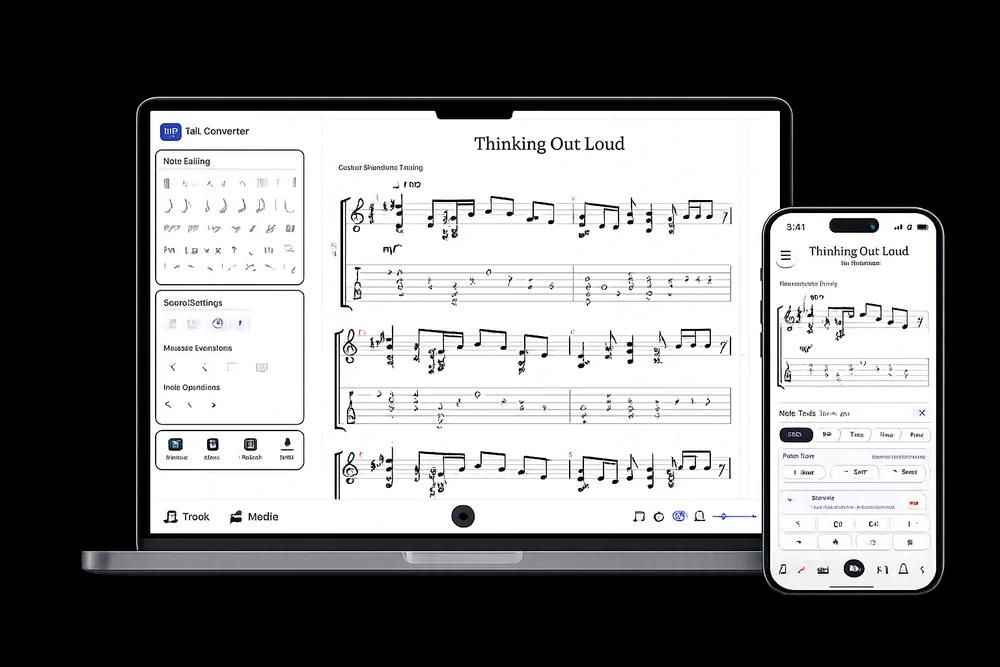
Open this result in the editor · nothing to install
431,990+ tabs, 71,997+ users
AI-Powered Guitar Tab Generation
Tabtify is a guitar tab maker for anything you can play or paste. The AI turns chords, riffs, and fingerpicking into a tab you can edit, play, and export.
Audio to guitar tab, MIDI to guitar tab, YouTube to guitar tab, plus TikTok, Instagram, and other public links.
01
Paste a link or upload audio
YouTube, TikTok, Instagram, MIDI, or a recording.
02
AI writes the tab draft
Notes and rhythm land as an editable guitar tab.
03
Play, tweak, export
Loop hard bars. Export GP5, MIDI, PDF, MusicXML.

After the AI draft
A real tab editor, not a static download.
Play it back, edit any note, open GP5 or MusicXML you already have, and export in the format you need.
Edit the draft
Fix notes, timing, measures, and fret choices.
Check by ear
Play back, loop bars, match the source.
Export when ready
Guitar Pro, MIDI, PDF, MusicXML.
Open GP5, GPX, MusicXML, or start from a blank tab. Nothing to install.
Built for the instrument you play
Right string count and tuning before conversion starts.


Export when ready
Same formats the editor offers.
- MIDI (.mid)
- Guitar Pro (.gp)
- alphaTex (.alphatex)
- PDF (.pdf)
- MusicXML (.musicxml)
From the converter
Tabs made by Tabtify
Open any of them in the editor: play along with media sync, change a note, export to Guitar Pro or PDF.
Nothing Else Matters
Metallica
Stairway To Heaven
Led Zeppelin
Enter Sandman
Metallica
Sweet Child O' Mine
Guns N Roses
Master Of Puppets
Metallica
One
Metallica
Cocaine
Eric Clapton
Kashmir
Led Zeppelin
Fear Of The Dark
Iron Maiden
From players
Built for every kind of guitarist
How bedroom players, teachers, and cover bands use Tabtify to get from a take or link to something they can play.
Riffs to GP5 in one pass
Reviewing my own riffs used to be a pain. Now I record, upload, and get a GP5 to fix timing.
leo_t
Bedroom producer
Clean guitar parts from demos
Track separation is solid. I pull guitar lines out of rough demos without rebuilding the session.
kenji_s
Sound engineer
Bass that actually lands
Bass is usually an afterthought in these tools. This one catches the low-end grooves I care about.
chloe_b
Bassist
Fingerpicking without the slog
Fingerpicking detection saved me hours on an old folk tune I could not pick out by ear alone.
bill_h
Acoustic player
Lesson prep in half the time
I make student tabs every week. Prep time dropped a lot. Complex chords come out surprisingly clean.
aisha_j
Guitar instructor
Standard riffs yes, drop A better now
Great on standard-tuning riffs. Drop A used to struggle; the update got me much closer.
jonas_drop
Metal guitarist
Neo-soul chords into the DAW
Helps me unpack dense jazz/neo-soul shapes. MIDI export drops straight into my DAW.
sophie_c
Indie artist
Riffs to GP5 in one pass
Reviewing my own riffs used to be a pain. Now I record, upload, and get a GP5 to fix timing.
leo_t
Bedroom producer
Clean guitar parts from demos
Track separation is solid. I pull guitar lines out of rough demos without rebuilding the session.
kenji_s
Sound engineer
Bass that actually lands
Bass is usually an afterthought in these tools. This one catches the low-end grooves I care about.
chloe_b
Bassist
Fingerpicking without the slog
Fingerpicking detection saved me hours on an old folk tune I could not pick out by ear alone.
bill_h
Acoustic player
Lesson prep in half the time
I make student tabs every week. Prep time dropped a lot. Complex chords come out surprisingly clean.
aisha_j
Guitar instructor
Standard riffs yes, drop A better now
Great on standard-tuning riffs. Drop A used to struggle; the update got me much closer.
jonas_drop
Metal guitarist
Neo-soul chords into the DAW
Helps me unpack dense jazz/neo-soul shapes. MIDI export drops straight into my DAW.
sophie_c
Indie artist
Frequently Asked Questions
Everything you need to know about Tabtify's AI-powered guitar tab creation platform. From audio conversion to professional export formats.
How does Tabtify convert YouTube, TikTok, and other media links to MIDI and tabs?
Upload audio, paste a supported public media link, or make a recording. Describe the instruments you hear and indicate whether someone is singing. Adjust the instrument setup if needed, then convert and review the editable draft. You can also upload MIDI, which already contains note and instrument data.
- Audio, public media links (YouTube, TikTok, Instagram, Pinterest), live recording, and MIDI upload paths
- Instrument profiles for guitar, bass, 7-string guitar, and ukulele
- Instrument setup, tuning, capo, and guitar starting fret in Advanced
Can I export AI-generated tabs to GP5, PDF, or standard MIDI?
Every export format is open on any account, free included: MIDI, Guitar Pro (GP5), alphaTex, PDF, and MusicXML. Save a tab and you can reopen it later to keep editing or export it again.
Can I open GP5, GPX, MusicXML, or MXL files online?
Yes. Open existing Guitar Pro files such as GP3, GP4, GP5, GPX, and GP, plus MusicXML files including XML and MXL. Once the file is in the studio, you can play, edit, save, and export it.
What makes Tabtify accurate for guitar fingerstyle and hybrid picking?
String count, tuning, and capo help map notes to your instrument. For guitar, you can also set a starting fret in Advanced. Listen back and refine chords, timing, and fret positions in the editor.
How do teachers and content creators use Tabtify with AI tabs?
Educators and creators can turn recordings or MIDI files into editable tabs, clean up the result, save versions, and export GP5, MIDI, or PDF. Demo tabs also make it easier to show the workflow to students or an audience.
What's the difference between Tabtify and other tab creation tools?
Tabtify combines AI conversion with a real tab editor. You can start from audio, a public media link (YouTube, TikTok, Instagram, Pinterest), MIDI, or recording, choose the target instrument setup, then continue editing with playback, media sync, guitar neck visualization, and export tools.
- Audio, public media links, MIDI, and live recording conversion paths
- Real-time playback and guitar neck visualization for practice
- Free export to MIDI, Guitar Pro/GP5, PDF, and MusicXML
- Demo tabs and editor-ready playback examples
How long does it take to convert a song?
Processing time depends on source length and complexity. Short clips usually finish faster; longer recordings take more time. Sources can be up to 15 minutes long.
What audio sources work best with Tabtify?
Tabtify works with any audio source, but performs best with clean guitar recordings. Public media links (YouTube, TikTok, Instagram, Pinterest), MP3 files, WAV files, and live recordings all work well. For best results, use recordings where the guitar is clearly audible and not heavily mixed with other instruments or vocals.
Can I edit and customize the generated tabs?
Absolutely! Tabtify's professional editor gives you complete control over the generated tabs. You can:
- Add, remove, or modify notes and chords
- Adjust timing, dynamics, and articulations
- Add text annotations and lyrics
- Customize notation style and layout
- Apply effects like bends, slides, and vibrato