
Free · No account needed
Guitar tab maker, creator, and writer online
Write guitar tab for free in your browser, with notation and playback, then export it to Guitar Pro, MIDI, PDF, or MusicXML.
- Start a blank tabOpen the editor on an empty score and type fret numbers straight onto the strings.Start writing
- Open a fileEdit a Guitar Pro (GP, GP5, GPX), MusicXML, or alphaTex file you already have.Open a file
- AI · ProStart from a recordingUpload a song or your own playing, and AI writes a tab draft for you to correct here.Convert audio
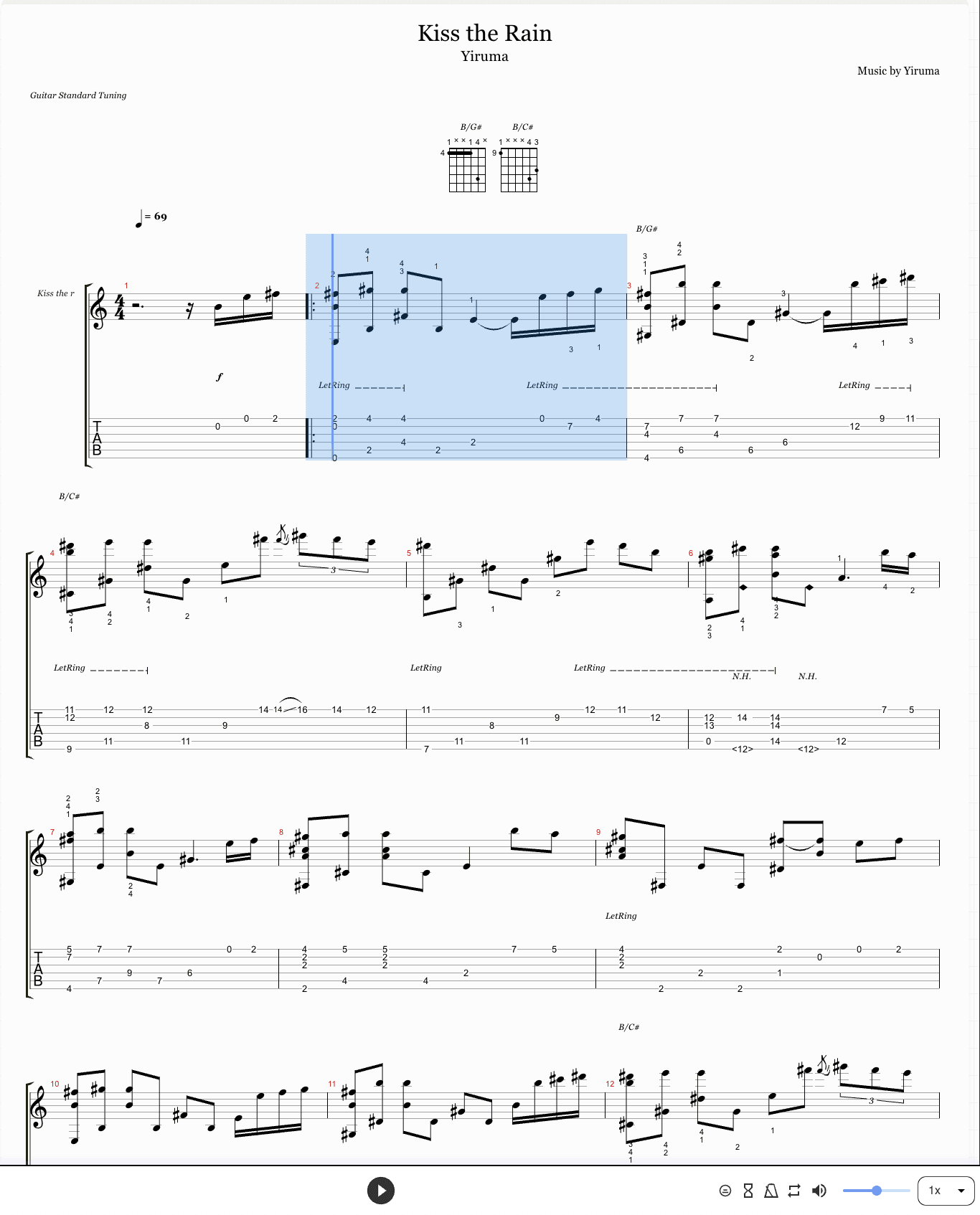
How to write tab in the editor
- 1
Pick a string and a beat
Click a spot on the tab staff, or move the cursor there with the arrow keys.
- 2
Type the fret number
Press the number keys. The note appears on the tab and in the notation above it at the same time.
- 3
Set the rhythm
Choose a note length in the Note Editing panel before you type, or select a note and change it afterwards.
- 4
Add techniques
Select a note and add a bend, slide, hammer-on, vibrato, palm mute, or harmonic from the same panel.
- 5
Play it back
Press Space to hear the tab with the cursor following along, and fix anything that sounds wrong.
Keyboard shortcuts
| Number keys | Type the fret on the selected string |
|---|---|
| Arrow keys | Move between strings and beats |
| Ctrl + Left / Right | Jump to the previous or next bar |
| Space | Play or pause |
| Delete / Backspace | Remove the selected note |
| Ctrl + Z / Ctrl + Y | Undo and redo |
| Ctrl + C / Ctrl + V | Copy and paste a measure |
| Ctrl + I | Insert a measure (add Shift to insert it before) |
| Ctrl + D | Delete the current measure |
| Esc | Clear the selection |
On a Mac, Cmd works in place of Ctrl.
Guitar tab symbols
Tab writes playing techniques as letters and signs between the fret numbers. These are the ones you will meet most often, and the editor's Note Editing panel has each of them.
- h
- Hammer-onExample: 5h7
- Pick the first note, then hammer a finger onto the second without picking again.
- p
- Pull-offExample: 7p5
- Pick the first note, then pull the finger off the string to sound the lower one.
- b
- BendExample: 7b9
- Push the string sideways until the note rises to the pitch of the second number.
- r
- ReleaseExample: 7b9r7
- Let a bent string come back down to its starting pitch.
- / \
- SlideExample: 5/7 7\5
- Slide along the string to the next fret without lifting the finger.
- ~
- VibratoExample: 7~
- Shake the note slightly so its pitch wavers.
- x
- Muted noteExample: x
- Rest the fretting hand on the string and pick it for a percussive click.
- PM
- Palm muteExample: PM 0 0 0
- Rest the side of the picking hand on the strings near the bridge.
- <12>
- Natural harmonicExample: <12>
- Touch the string lightly right over the fret and pick for a bell-like tone.
- ( )
- Ghost noteExample: (5)
- A quiet, barely played note.
Export, print, and save
- Guitar Pro (.gp)
- Opens in Guitar Pro 7 and 8, with every technique intact.
- MIDI (.mid)
- For a DAW, a notation app, or a backing track.
- For printing, or for sending the part to a bandmate.
- MusicXML
- Opens in MuseScore, Sibelius, and most notation software.
- alphaTex
- Plain text notation you can keep in version control and open here again.
Every export is free. A free account also saves up to 3 tabs to your library, so you can come back and keep editing.
Bass and ukulele tab
The editor opens and writes tab for any stringed instrument in a Guitar Pro or MusicXML file, including 4 and 5-string bass and ukulele. To start from a recording instead, the converter writes bass and ukulele tab too.
Rather start from the song?
Upload a recording or paste a YouTube link, and Tabtify writes a tab draft you can finish in this editor.
Turn a song into tabTab maker FAQ
Is this guitar tab maker free?
Yes. Writing, playback, and every export format are free, with no account needed. A free account also saves up to 3 tabs to your library.
Do I need Guitar Pro?
No. The editor runs in your browser and opens Guitar Pro files directly. A .gp file you export from it opens in Guitar Pro 7 and 8.
How do I add a bend, slide, or hammer-on?
Select the note, then pick the technique in the Note Editing panel. The tab shows the symbol, and playback plays it.
Can I print my tab?
Yes. Choose PDF in Export: the print window opens with the score laid out, and you can print it or save it as a PDF.
Can I write bass or ukulele tab?
Yes. Open a bass or ukulele file from Guitar Pro or MusicXML, or start from a recording with the bass or ukulele converter.
What is the difference between tab and standard notation?
Tab shows which string and fret to play; notation shows pitch and rhythm. The editor shows both and keeps them in sync, so you can read whichever you prefer.
Can I turn a song into tab automatically?
Yes, with AI conversion, which is part of Pro. Upload the song or a recording, then edit the draft it writes in this same editor.